There is a small, endlessly repeated wrongness in most scheduling software: it picks one noun and gives it to everybody. Imagine a physiotherapist being told they have bookings, a restaurant with appointments, or a consultancy managing reservations. These mismatches seem trivial but have profound implications. The terminology used in scheduling software is not just a matter of semantics. It shapes the customer experience and reflects the business's identity. When automated messages carry unfamiliar vocabulary, it distances the customer from the service. A restaurant's clientele expects a reservation confirmation, not an appointment reminder. This subtle misalignment can erode trust and clarity, leading to confusion and dissatisfaction.
This article examines why terminology customization in scheduling software is crucial for businesses across various service industries. By the end, you'll understand how the right terminology impacts customer communication, the importance of aligning software language with business identity, and practical steps to ensure your automated messages resonate accurately with your audience.
How Terminology Affects Customer Perception
Terminology in scheduling software significantly influences customer trust and perception. When the language used aligns with industry-specific expectations, it enhances clarity and fosters trust. Conversely, mismatched terminology can lead to confusion and erode confidence in the service.
According to SAGE Journals, the language used in systems plays a crucial role in shaping user trust and their responses to system errors. This finding underscores the importance of terminology in customer interactions.
Trust and Responses
Imagine a customer booking a table at a fine dining restaurant. They expect a reservation confirmation, not an appointment reminder. This distinction matters because terminology directly affects perception. When the language used in communications aligns with customer expectations, it builds trust. Trust is vital in service industries where customer satisfaction is closely tied to repeat business and referrals.
Incorrect terminology can lead to misunderstandings. For example, a physiotherapy clinic using the term "reservation" instead of "appointment" might confuse patients, leading them to question the professionalism and reliability of the service. This confusion can diminish trust and negatively impact the customer relationship.
Industry-Specific Language Enhances Clarity
Industry-specific language is not merely a stylistic choice; it is a functional necessity. Clear communication is essential for setting accurate expectations and ensuring customer satisfaction. By using terminology that resonates with the industry, businesses can enhance clarity and reduce the likelihood of misunderstandings.
Consider the following comparison:
| Industry | Preferred Terminology | Misaligned Terminology |
|---|---|---|
| Restaurant | Reservation | Appointment |
| Physiotherapy | Appointment | Booking |
| Consultancy | Meeting | Reservation |
In each case, using the preferred terminology aligns with customer expectations and enhances clarity. A restaurant patron expects a reservation, while a physiotherapy patient anticipates an appointment. This alignment is crucial for maintaining a professional image and ensuring smooth customer interactions.
Practical Implications
To implement effective terminology customization, businesses should assess their current systems and identify areas where language misalignments occur. This process involves reviewing automated messages, interfaces, and customer communications to ensure consistency and accuracy.
Additionally, businesses can benefit from language customization in software, allowing them to tailor terminology to specific industry needs. By doing so, they can enhance customer experience and strengthen trust.
In summary, terminology customization in scheduling software is not just a matter of semantics. It is a strategic decision that impacts customer perception and trust. By aligning language with industry-specific expectations, businesses can improve clarity, reduce confusion, and foster stronger customer relationships.
The Difference Between Appointments and Reservations
Understanding the distinction between appointments and reservations is crucial for businesses to communicate effectively with their customers. Each term carries specific implications regarding the nature of the service or product being offered.
Appointments: Personal Time
Appointments typically involve booking a professional's personal time. This is common in industries like healthcare, consulting, and personal services. When a customer schedules an appointment, they expect dedicated attention from a professional at a specific time. This expectation necessitates precise scheduling to avoid overlaps and ensure quality service.
For example, a physiotherapy clinic uses appointments to allocate time for each patient. This ensures that the therapist is available to provide personalized care. Mislabeling this as a reservation could confuse patients, leading them to believe they are securing a place in a queue rather than a dedicated session.
Reservations: Spaces and Resources
Reservations, on the other hand, are about securing a space or resource. This is prevalent in hospitality, dining, and event management. A reservation holds a spot, such as a table, room, or seat, often with minimal upfront payment. According to FluentThemes, reservations typically involve less commitment than bookings, which can lead to different customer expectations.
Consider a restaurant that offers reservations for tables. Customers understand that their reservation guarantees them a place at the restaurant but not necessarily a specific server's attention. If this were miscommunicated as an appointment, it might lead to misunderstandings about the nature of the service.
Implications for Businesses
Choosing the wrong term can lead to customer confusion and dissatisfaction. When a business uses terminology that does not align with customer expectations, it risks miscommunication and potential loss of trust.
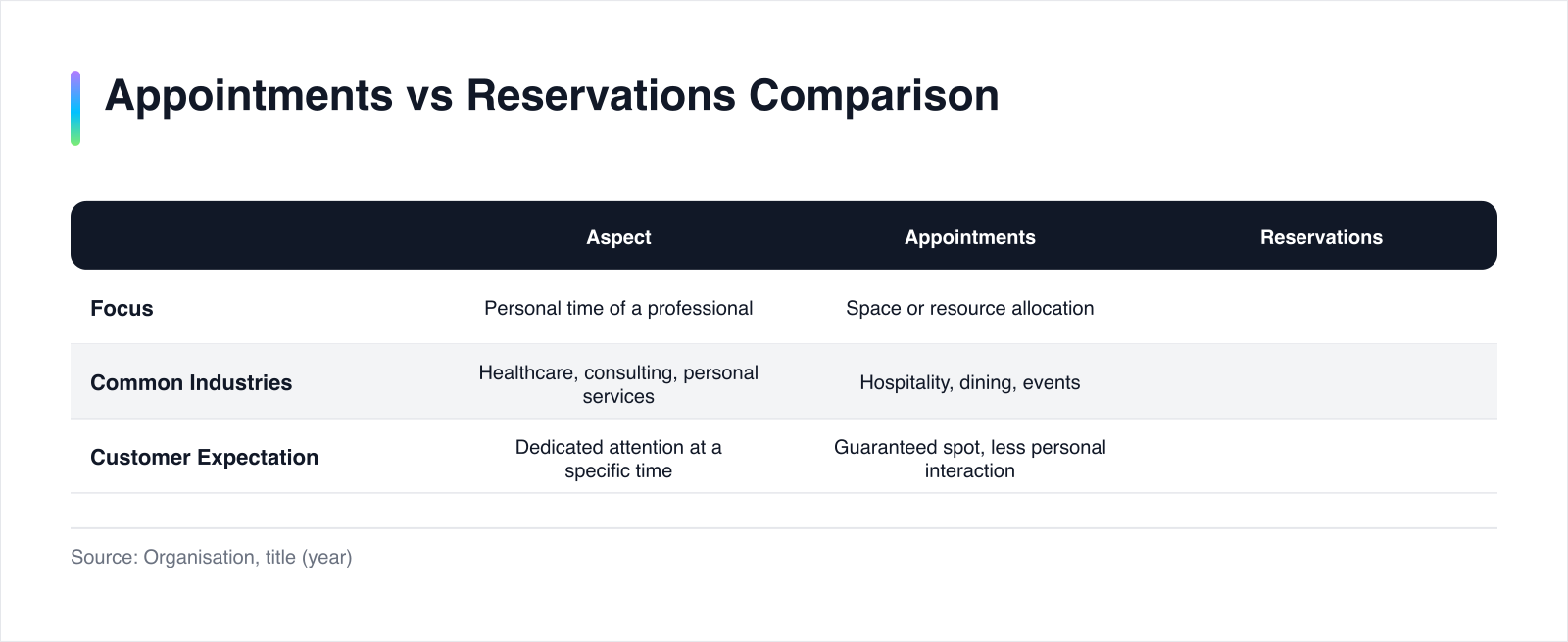
| Aspect | Appointments | Reservations |
|---|---|---|
| Focus | Personal time of a professional | Space or resource allocation |
| Common Industries | Healthcare, consulting, personal services | Hospitality, dining, events |
| Customer Expectation | Dedicated attention at a specific time | Guaranteed spot, less personal interaction |
Suppose a consultancy firm mistakenly labels its client meetings as reservations. Clients might assume they are merely securing a place rather than receiving personalized advice. This misalignment can degrade the perceived value of the service.
Aligning Terminology with Business Needs
To avoid such pitfalls, businesses should assess their service offerings and align their terminology accordingly. This involves reviewing automated messages and ensuring that language customization in software reflects the business's specific needs. By doing so, businesses can enhance clarity and meet customer expectations effectively.
For further insights into tailoring software language to business needs, consider exploring language customization in software. This approach can significantly improve customer communication and satisfaction.
In summary, distinguishing between appointments and reservations is more than a semantic exercise. It is a strategic decision that impacts how customers perceive and interact with a business. By aligning terminology with the nature of the service, businesses can foster clearer communication and stronger customer relationships.
How to Customize Terminology in Scheduling Software
Customizing terminology in scheduling software is a strategic move that enhances communication and aligns the software with business identity. By tailoring language, businesses can ensure that automated messages resonate with customer expectations and industry standards.
Understanding Software Customization Levels
Different scheduling platforms offer varying levels of customization. Some allow extensive modifications, while others provide limited options. Understanding these differences is crucial for selecting the right tool.
| Platform | Customization Level | Features Available |
|---|---|---|
| Salesforce | High | Renaming labels, modifying flows, adding/removing fields (Salesforce) |
| Apptoto | Moderate | Customizable SMS, email, and call templates (Apptoto) |
Salesforce offers a high level of customization, enabling businesses to rename labels, modify workflows, and adjust fields. This flexibility allows companies to align scheduling terminology with their specific needs. Apptoto provides moderate customization, allowing businesses to tailor automated messages to fit the timing and purpose of appointments.
Implementing Terminology Customization
To effectively customize terminology, businesses should follow a structured approach. This involves evaluating current systems, identifying misalignments, and implementing changes that reflect industry-specific language.
Step 1: Evaluate Current Systems
Begin by assessing the existing scheduling software. Identify any terminology that does not align with the business's industry or customer expectations. This evaluation should include reviewing automated messages, interfaces, and customer communications.
Step 2: Identify Misalignments
Determine where language misalignments occur. For example, if a restaurant's software refers to reservations as appointments, this needs correction. Recognizing these discrepancies is vital for accurate communication.
Step 3: Implement Customization
Once misalignments are identified, implement changes using the software's customization features. Platforms like Salesforce and Apptoto offer options to rename labels and adjust message templates. Ensure that the chosen terminology reflects the business's identity and resonates with customers.
Step 4: Test and Refine
After implementing changes, test the system to ensure consistency and accuracy. Gather feedback from staff and customers to identify any remaining issues. Refine the terminology as needed to maintain clarity and professionalism.
Checklist for Effective Customization
To guide businesses through the customization process, consider the following checklist:
| Task | Description |
|---|---|
| Evaluate Current Terminology | Review existing language in the software and identify misalignments. |
| Customize Labels and Messages | Use software features to align terminology with industry standards. |
| Test for Consistency | Ensure that changes are consistent across all customer communications. |
| Gather Feedback | Collect input from staff and customers to refine the terminology. |
| Monitor and Adjust | Continuously monitor the system and make adjustments as needed. |
By following these steps, businesses can enhance communication and strengthen customer relationships. Customizing terminology is not merely a technical task but a strategic decision that reflects the business's values and identity. For further insights on tailoring software language, explore language customization in software.
Case Studies: Successful Terminology Customization
Real-world examples illustrate the tangible benefits of terminology customization in scheduling software. By aligning software language with business identity, companies have achieved improved customer satisfaction and clearer communication.
Real-World Success Stories
SimpleSpa's Approach
SimpleSpa provides an exemplary case of effective terminology customization. By allowing businesses to tailor email notifications, SimpleSpa ensures that communication aligns with industry-specific language. According to SimpleSpa, clients can customize email reminders and notifications, which helps maintain consistency with their brand and service expectations. This customization has led to a more personalized customer experience, enhancing satisfaction and loyalty.
Restaurant Chain Example
Consider a hypothetical scenario involving a restaurant chain that initially used generic scheduling software referring to all bookings as "appointments." This misalignment confused customers, leading to frequent inquiries and misunderstandings. By switching to a platform that allowed for terminology customization, the chain redefined its communications to use "reservations." This change resulted in clearer messaging and a reduction in customer confusion.
Improved Customer Satisfaction
Customization of terminology has a direct impact on customer satisfaction. When businesses use language that resonates with their audience, it fosters a sense of familiarity and trust. This alignment is crucial for maintaining strong customer relationships and ensuring repeat business.
Imagine a consultancy firm that initially labeled client meetings as "reservations." Clients, expecting personalized attention, often felt misled. By customizing their scheduling software to use "meetings," the firm clarified expectations and improved client satisfaction. This simple change reduced confusion and reinforced the firm's professional image.
Worked Scenario: A Physiotherapy Clinic
Suppose a physiotherapy clinic faced issues with patients misunderstanding their appointment scheduling. The clinic's software referred to sessions as "reservations," leading to confusion about the nature of the service. By customizing the terminology to "appointments," the clinic aligned its communications with patient expectations.
| Aspect | Before Customization | After Customization |
|---|---|---|
| Terminology | Reservations | Appointments |
| Customer Feedback | Frequent confusion | Clear understanding |
| Satisfaction | Moderate | High |
This change not only enhanced clarity but also improved patient satisfaction and reduced administrative burden. By aligning terminology with industry standards, the clinic ensured that patients received consistent and accurate information.
Strategic Alignment
These examples demonstrate that terminology customization is not merely a technical adjustment but a strategic alignment with business goals. By using language that reflects their identity, businesses can enhance communication and build stronger relationships with their customers.
For further insights into tailoring software language to business needs, explore language customization in software. This approach can significantly improve customer communication and satisfaction, ensuring that businesses meet industry-specific expectations effectively.
Integrating Custom Terminology into Automated Messages
Ensuring that custom terminology is reflected in automated communications is essential for maintaining consistency and clarity across all customer interactions. This section provides a step-by-step method to achieve effective integration.
Aligning Automated Messages with Custom Terminology
Automated messages are a critical touchpoint between businesses and their customers. To ensure these communications reflect the chosen terminology, businesses must align all automated messaging systems with their customized language. This alignment enhances clarity and reinforces the brand's identity.
Imagine a restaurant that has customized its scheduling software to use "reservations" instead of "appointments." To maintain consistency, every automated message, whether it's a confirmation, reminder, or cancellation, must use the term "reservation."
Step-by-Step Method for Integration
Step 1: Audit Existing Messages
Begin by auditing all existing automated messages. Identify any instances where the terminology does not align with the customized language. This audit should cover SMS, email, and voice communications. According to Apptoto, businesses can use features like customizable SMS, email, and call templates to tailor messages effectively.
Step 2: Customize Message Templates
Once discrepancies are identified, customize the message templates to reflect the chosen terminology. This involves editing the language in each template to ensure consistency. For example, replace any instance of "appointment" with "reservation" in the restaurant's communication templates.
Step 3: Implement Across Channels
Ensure that the customized terminology is implemented consistently across all communication channels. This includes integrating the changes into CRM systems, email marketing platforms, and any other tools used for customer interactions.
Step 4: Test and Validate
After implementing the changes, test the automated messages to validate their accuracy and consistency. Send test messages to ensure that the terminology aligns with customer expectations and that there are no errors in the communication process.
Consistency Across Channels
Effective communication requires consistency across all channels. This consistency not only strengthens the brand's identity but also reduces customer confusion. By aligning terminology across every touchpoint, businesses can enhance the customer experience and build trust.
Consider a consultancy firm that uses "meetings" instead of "reservations." If their email confirmations, SMS reminders, and CRM interfaces all reflect this terminology, clients receive a coherent and professional message.
| Communication Channel | Consistency Check |
|---|---|
| Ensure templates use custom terminology consistently. | |
| SMS | Verify that text messages reflect the chosen language. |
| CRM | Confirm that CRM interfaces and notifications align with terminology. |
Monitoring and Feedback
Once the integration is complete, continuously monitor the automated messages to ensure ongoing consistency. Gather feedback from customers and staff to identify any areas for improvement. Adjust the messaging as needed to maintain alignment with business goals and customer expectations.
By following this structured approach, businesses can effectively integrate custom terminology into their automated communications, enhancing clarity and customer satisfaction. For further insights on aligning software language with business needs, explore language customization in software.
The Strategic Importance of Terminology Customization
Terminology customization in scheduling software is a strategic decision that directly impacts customer communication and business identity. By aligning language with industry-specific expectations, businesses can enhance clarity, build trust, and improve customer satisfaction. This alignment is not merely a technical adjustment but a reflection of the company's values and the service it offers.
Companies should assess their current scheduling systems and identify areas where terminology might misalign with their brand and customer expectations. This involves auditing automated messages, interfaces, and customer interactions to ensure consistency across all touchpoints. Implementing a structured approach to customize terminology can significantly enhance communication and reduce misunderstandings.
The next logical step for businesses is to explore tools and platforms that offer robust customization capabilities. By doing so, they can tailor their scheduling software to meet specific industry needs and customer preferences. For further insights into aligning software language with business needs, consider exploring language customization in software.
For those seeking an integrated approach, Komplian offers an AI-native CRM that runs these workflows, providing a smooth experience for both businesses and their customers. By prioritizing terminology customization, companies can ensure that their communication resonates with their audience, fostering stronger relationships and driving business success.
Sources & Further Reading
- FluentThemes. "Booking vs Reservation: What's the Difference?" (2026-08-07). https://fluentthemes.com/arb/blog/booking-vs-reservation
- Apptoto. "Auto Messages" (2026-08-15). https://www.apptoto.com/apptoto-manual/article/message-setup/auto-messages/
- SimpleSpa. "Email Notifications" (2026-08-28). https://www.simplespa.com/documentation/notifications/
- Salesforce. "Customize Workforce Scheduling" (2026-08-31). https://help.salesforce.com/s/articleView?id=service.fs_customize_workforce_scheduling.htm&language=en_US&type=5
- SAGE Journals. "How Terminology Affects Users’ Responses to System Failures" (2023-09-21). https://journals.sagepub.com/doi/10.1177/00187208231202572